
Informed Delivery® Mobile
United States Postal Service®Business
4.82.32K Reviews
- Version
- 1.3.3
- Installs
- 500.00K
- Age Rating
- Everyone
Screenshots
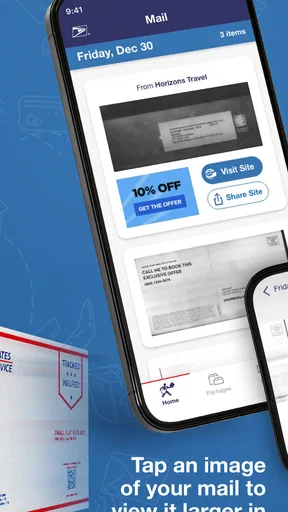
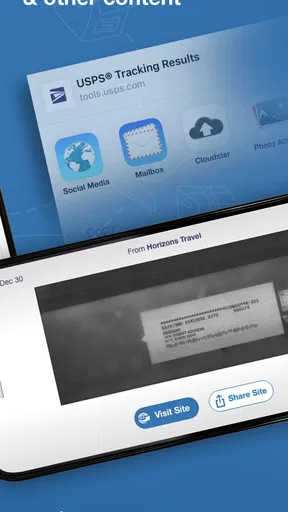
Our Review of Informed Delivery® Mobile
 Analysis by Appyee
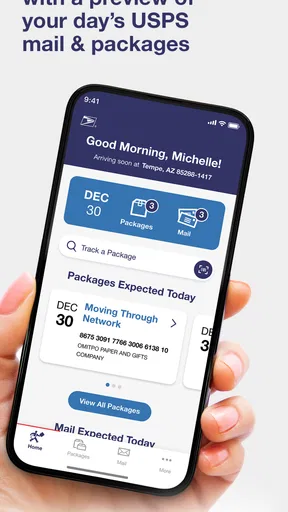
When I want a quick view of what is moving through my mailbox, I prefer checking one focused place instead of sorting through delivery emails, carrier pages, and paper notices. That is the role of Informed Delivery® Mobile, a free business app from United States Postal Service®. It is built around viewing USPS mail and packages, and in my experience its value comes from turning a vague “something should arrive soon” feeling into a more manageable daily check.
The app is especially useful when I am away from home, waiting for an important envelope, or trying to keep track of several deliveries at once. It is not a replacement for every postal service task, and it does not remove the uncertainty that can affect physical delivery. Still, as a mobile window into my USPS mail activity, it feels more practical than relying only on the mailbox or searching through old notifications.
From a busy morning to a clearer delivery plan
I find the most useful way to approach this section is to think of the app as one household checkpoint, not a shared account everyone should automatically use. Next, I’ll look at the practical boundaries that matter when more than one person is involved, including how to keep delivery awareness helpful without blurring personal account access.
What I start with before opening the app
The most realistic starting point is simple: I know that mail or a package may be coming, but I do not want to guess when I should check the door or mailbox. That situation happens when I am expecting a document, monitoring household deliveries, or trying to avoid missing a parcel while my day is split between work and errands.
Opening the app gives me a more deliberate routine. Rather than treating every delivery as an interruption, I can look at the available mail and package information, decide whether anything needs attention, and then continue with my day. That small change matters because the app is most useful as a planning tool, not as a promise that a delivery will arrive at an exact moment.
The presentation also makes sense for the app’s audience. It belongs to the business category, but I would not limit it to company owners or office workers. A household can use it for personal correspondence, online orders, and shared delivery awareness. The Everyone age rating also fits its straightforward purpose: it is a practical postal utility rather than an entertainment app.
Getting into the daily checking habit
My preferred workflow is to check it at a natural point in the day, such as before leaving home or after receiving a delivery alert elsewhere. I look first for anything that could change my plans. A package may need a different handoff from ordinary mail, while an expected letter may simply be something I want to watch for.
This is one of the app’s less obvious strengths: it can reduce unnecessary checking without making me ignore deliveries completely. If there is nothing relevant, I can stop thinking about the mailbox for a while. If something stands out, I have a reason to pay closer attention. That is more useful than opening a generic shopping app that only knows about a particular order.
I also find it helpful for people who manage deliveries for more than themselves. A parent, caregiver, or housemate may need a shared understanding of what is arriving, even when the person who placed an order is not at home. The app does not turn that into a full household logistics system, but it can provide a common point of reference for USPS-related mail.
Following the information from screen to doorstep
The central flow is easy to understand: open the app, review the mail and package view, identify what matters, and use that information to decide what to do next. The outcome is not necessarily an action inside the app. Often the useful result is knowing whether I need to stay available, ask someone to check the property, or simply wait.
That distinction is important. People who expect a full shopping-style tracking experience may find the app narrower than expected. Its purpose is connected to USPS mail and packages, not to every shipment from every carrier. If an order is traveling through another delivery company, I still need that carrier’s own service or the retailer’s tracking page. For a mixed delivery day, I may use several tools side by side.
Compared with checking the physical mailbox first, the app gives me earlier context. Compared with a retailer’s order page, it can be more useful when I care about postal mail itself rather than one purchase. Compared with a general package-tracking app, its advantage is being centered on the USPS side of the journey. The trade-off is that it is not a universal dashboard for all carriers and all delivery events.
Where handoffs become important
Delivery information passes through several hands before it becomes something I can act on: the postal system processes the item, the app presents the available view, and I decide how to respond. That means the app is only one part of the chain. It can help me understand the postal side, but it cannot control the final arrival or guarantee that the physical item is immediately available.
This is where I keep my expectations realistic. A digital view can tell me that something is associated with my mail or package activity, but I still need to consider the practical handoff at home. If nobody is present, the next step may involve waiting, checking the property later, or using whatever delivery instructions are available through the appropriate USPS process. The app helps me prepare; it does not replace the doorstep experience.
For an office, the handoff can be even more useful. Someone responsible for incoming mail can review the day’s expected items, alert a colleague, and reduce the chance that an important delivery sits unnoticed. I would still pair that habit with the office’s normal mailroom process, because a digital view should support physical handling rather than become the only record people trust.
A practical scenario: an important envelope and a package
Imagine that I am waiting for an important letter while also expecting a package ordered online. I open Informed Delivery® Mobile before starting work and review what is shown for USPS activity. The letter matters because I need to notice it, while the package matters because I may want to be available when it arrives.
Instead of making repeated trips to the mailbox, I use the information to organize my day. I might ask someone at home to check later, delay a short errand, or decide that there is no reason to change my plans yet. When I return, I can compare the digital expectation with what actually arrived and follow up through the relevant postal or retailer channel if the physical handoff does not match what I expected.
The benefit here is not dramatic automation. It is reduced mental clutter. The app gives me a starting point, a reasoned next step, and a way to avoid treating every delivery as an emergency. That is the kind of everyday value I would explain to a friend considering it.
Useful habits that make the app more effective
First, I would use it as a planning aid rather than a stopwatch. Delivery activity can help me decide when to pay attention, but I would not arrange an entire day around an assumed exact arrival time. This prevents one of the most common frustrations with any delivery-tracking tool: confusing an estimate or status view with a guaranteed appointment.
Second, I would separate USPS information from retailer information. If I am waiting for an order, I keep the retailer’s order page available for purchase details and use the postal app for the USPS portion of the journey. This two-source approach may sound less convenient, but it avoids blaming the wrong service when something changes in transit.
Third, I would make the check part of an existing routine instead of opening the app constantly. A morning review and an evening follow-up are more sensible for most people than repeated refreshing. The app becomes a calm checkpoint rather than another source of notifications and uncertainty.
Fourth, I would treat the physical mailbox and delivery area as the final authority for what is actually present. The app can improve awareness, but the outcome still depends on the item reaching the correct place and being available for collection. That simple rule keeps the digital view useful without overestimating it.
What feels smooth in version 1.2.0
Using the current version, 1.2.0, I see the appeal of keeping this service in a dedicated mobile app. The narrow focus makes the purpose easy to understand: this is where I go when I want a view of USPS mail and packages, not where I manage every kind of online purchase or general business task.
The app also benefits from trust and familiarity. United States Postal Service® is the developer, so the service feels directly connected to the postal organization rather than being an unrelated layer placed on top of delivery information. That does not eliminate the need to check details carefully, but it makes the app a more natural choice for people who primarily use USPS.
Its reception is strong as well, with a 4.7 average from around 4.2 thousand ratings and more than 500 thousand installs. I do not treat those figures as proof that every person will have the same experience, but they do suggest that the basic idea is resonating with a substantial group of users. The free price also lowers the barrier to trying it, especially for occasional users who do not want another subscription.
Where the workflow can break
The first weak point is coverage. If my delivery life is spread across USPS, private carriers, local couriers, and retailer-specific services, this app cannot serve as the only dashboard. I would choose a broader package-tracking option when seeing all carriers in one place matters more than having a USPS-focused view.
The second weak point is the gap between digital visibility and physical certainty. A mail item appearing in the app does not mean I can retrieve it immediately, and a package view does not remove the possibility of delay or a changed delivery situation. Anyone needing guaranteed appointment-style coordination should use the appropriate delivery arrangements instead of relying only on this app.
The third issue is that a focused tool may feel unnecessary for light users. If I rarely receive packages, check my mailbox every day, and do not have important mail to monitor, the app may add little to my routine. In that case, the ordinary mailbox and occasional retailer updates may be enough.
There is also a human handoff problem. A household can see information digitally, but someone still has to collect mail, notice a package, and decide what to do with it. In an office, the app may improve awareness while creating one more responsibility: someone must interpret the information and communicate it clearly. I would establish a simple rule about who checks and who follows up, rather than assuming the app itself solves coordination.
Who should install it, and who should skip it
I would recommend it to people who regularly use USPS and want a convenient way to review incoming mail and packages from a phone. It is a particularly good fit for anyone who travels, works irregular hours, shares responsibility for a household, or has an important delivery that deserves attention without constant mailbox checks.
It also makes sense for small offices that want a quick view of postal activity before assigning someone to check incoming mail. The free price makes experimentation easy, and the Everyone rating means the app is accessible to a broad household audience.
I would skip it if my main need is one combined view across every carrier, if I require exact delivery appointments, or if I already have a reliable routine that gives me all the information I need. I would also avoid treating it as a substitute for retailer order details. For those situations, a carrier-neutral tracking service or the merchant’s own app may be a better fit.
My final assessment after following the full workflow
In my view, Informed Delivery® Mobile succeeds because it addresses a small but real problem: knowing what USPS mail and packages deserve attention before I physically reach the mailbox or door. The complete workflow is clear, from opening the app and reviewing the postal view to deciding whether a person, errand, or follow-up is needed.
Its best quality is focus. It does not try to become a universal shopping assistant, and that makes it easier to understand when USPS is the part of the delivery chain I care about. Its biggest limitation is the same focus: mixed-carrier households and users who need guaranteed timing will probably need another tool as well.
With a 4.7 average and a growing base of users, it has earned a serious look from anyone who wants a free USPS-centered mobile utility. I would recommend trying it with modest expectations: use it to plan, notice, and coordinate, then let the physical delivery and the appropriate postal process complete the handoff. It is most valuable when it helps me make a better decision, not when I expect it to eliminate every uncertainty in delivery.
Privacy and Permissions
See what permissions an app requests and how it handles your data.
- Camera
- take pictures and videos
- Other
- view network connections, full network access, run at startup, prevent device from sleeping
Verdict
Strengths of Informed Delivery® Mobile
- Preview incoming letters and packages before they arrive.
- Convenient access to delivery updates from a mobile device.
- Can help spot missing or unexpected mail early.
- Useful for managing deliveries when away from home.
- Free service for eligible USPS residential addresses.
Limitations of Informed Delivery® Mobile
- Availability depends on USPS coverage and address eligibility.
- Mail previews may not include every item or arrive instantly.
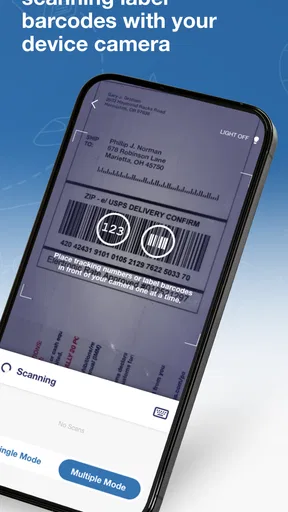
- Scanning quality can make some envelope details difficult to read.
- Package updates depend on carrier tracking information.
- Requires account setup and identity verification to use.
Other Releases by United States Postal Service®
View All
USPS MOBILE®
Business4.7
Similar Picks in This Category
View All
LinkedIn: Community & Network
LinkedIn3.8

Zoom Workplace
zoom.com4.1

Microsoft Teams
Microsoft Corporation4.6

Meta Business Suite
Meta Platforms, Inc.4.6

Webex Meetings
Cisco Systems, Inc.4.5

TeamViewer Remote Control
TeamViewer4.4
Frequently Asked Questions
What is Informed Delivery® Mobile?
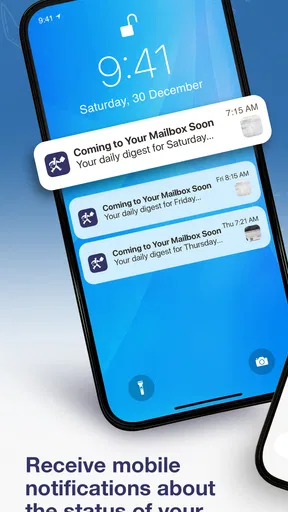
Informed Delivery® Mobile is the official United States Postal Service app for managing your Informed Delivery experience on a smartphone. It lets eligible users preview grayscale images of incoming letter-sized mail, view package updates, track shipments, and receive delivery notifications. The app is most useful for people who want a convenient way to check expected mail without visiting a mailbox or repeatedly entering tracking numbers.
How does Informed Delivery work in the app?
After signing in to an eligible USPS.com account, the service connects your address with mail and packages being processed through participating USPS facilities. You may see digital previews of certain incoming mailpieces, usually on the day they are scheduled for delivery, along with package tracking information. Mail previews are not photographs of the contents, and availability can vary depending on the mailpiece, processing time, address, and USPS eligibility rules.
Is Informed Delivery® Mobile free to use?
Yes. Informed Delivery is a free USPS service, and the official mobile app does not normally require a subscription fee to access its core features. You will need a USPS.com account and must complete the identity verification and address eligibility process. Standard mobile data or Wi-Fi usage may apply, and any separate postage, shipping, or optional USPS service charges are not included simply by using the app.
What information and permissions does the app require?
The app requires you to sign in with your USPS.com credentials and may ask for personal information needed to verify your identity and confirm that you are associated with an eligible residential or business address. Depending on the device and enabled features, it may request notification permission so it can alert you about mail or packages. Review the app’s current privacy policy and permission prompts before accepting access.
Can I track packages and manage deliveries with the app?
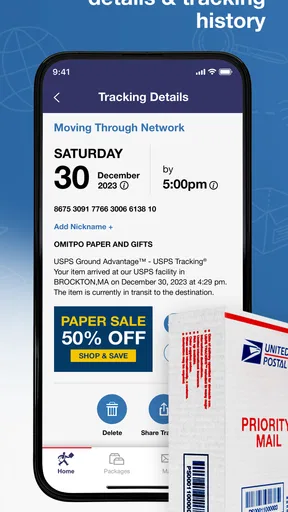
Yes. In addition to mail previews, the app provides access to USPS package tracking and delivery updates associated with your account or tracking numbers. Depending on the shipment, you may be able to view the latest scan, estimated delivery information, and available delivery-management options. Tracking events are based on USPS scans, so updates can sometimes be delayed, incomplete, or changed as the package moves through the network.
